
Kala: Learn Ukulele & Tuner
MusopiaMusic & Audio
4.6760.00 Reviews
- Version
- 3.19.3
- Installs
- 500.00K
- Age Rating
- Everyone
Screenshots



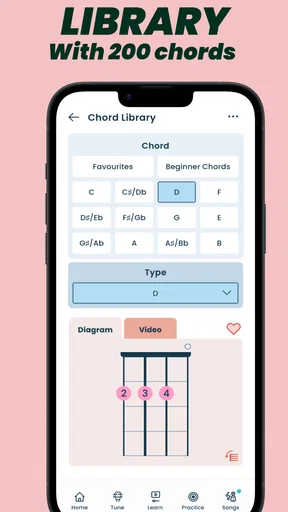
Our Review of Kala: Learn Ukulele & Tuner
 Analysis by Appyee
Sharing a ukulele at home can turn a short practice session into an easy way to spend time together. I’d use Kala: Learn Ukulele & Tuner as a starting point when one person owns the instrument and others want to try a few chords, follow a lesson, or pick a song to learn. Its mix of instruction and tuning tools suits that casual handoff better than keeping separate lesson videos and a tuner open elsewhere. The key is to treat it as a shared learning aid, not assume it will manage who is using it or preserve separate household routines for you.
A practical rhythm for a shared instrument
For a realistic evening routine, I’d tune the ukulele first, let one person work through a small lesson, then pass it along so the next player can repeat the same chord changes. That simple order helps avoid the common household problem of everyone starting at a different point and nobody remembering what they meant to practise. A learner can use the lessons to follow a structured path, while a more confident player can help with finger placement or keep time. The app gives the group a shared reference, but the real teaching still comes from listening to one another and taking turns.
This arrangement is especially useful when a child or first-time adult is curious but not ready to commit to regular lessons. A short practice can answer the important question—does holding and strumming a ukulele feel enjoyable?—without turning the first attempt into a big project. I’d keep the goal modest: tune the instrument, learn a couple of shapes, and play a slow change between them. If the learner enjoys that, the app’s guided approach gives them somewhere to continue; if not, the instrument can go back on the shelf without anyone having bought into a formal course.
Separate practice habits matter
On a device used by more than one person, I’d agree on a simple boundary before opening the lessons: who is practising, what they want to learn, and whether the next person should continue the same session or start their own. That is not glamorous, but it prevents one player’s choices from becoming confusing context for another. If several people share one phone or tablet, taking turns deliberately is more reliable than expecting the app to act like a household scheduler.
I’d also keep the instrument itself part of the routine. A tuner can help each player begin from a usable starting point, but it cannot correct an uncomfortable grip or make a rushed practice session productive. Before handing the ukulele over, check that the next person can see the screen, hear the sound clearly, and reach the instrument comfortably. This is a small practical detail, yet it often matters more than adding another feature to a beginner’s setup.
Choosing what to practise together
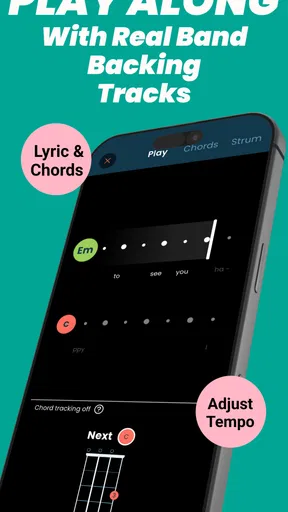
When players have different tastes, the song library can be a useful way to agree on a common target instead of debating what to learn. I’d let each person suggest something, then choose one song the group is willing to revisit. A beginner can focus on a chord transition while a more experienced player works on keeping the rhythm steady. This makes the shared session less like a lesson everyone must take at the same pace and more like a small collaboration.
There is a trade-off: a familiar song can make practice feel rewarding, but it may also tempt a new player to rush ahead before the chord changes are comfortable. I’d use the song as motivation, then return to the simpler exercise when the fingers get tangled. That alternation—brief, enjoyable playing followed by deliberate repetition—is a more realistic household habit than expecting a learner to stay engaged with drills for a long stretch.
Who will get the most from it
I’d recommend the app most readily to a beginner who wants a guided route into ukulele, likes learning through short demonstrations, and will practise on an acoustic instrument nearby. It also makes sense for someone returning after a break: basic instruction and a tuner can help rebuild a routine without searching through unrelated videos. Musopia is the developer, and the app sits in the music and audio category, but its appeal is quite specific: it is for people who want to learn by playing rather than simply browse music.
If you already know your chords and mainly want detailed theory, notation, or advanced arrangement work, I’d choose a resource built around those goals instead. Likewise, a learner who needs a live teacher to correct posture and finger placement may find video guidance insufficient on its own. The app can show and structure practice, but it cannot watch your hands in the room or tell you why a particular chord buzzes. Pairing it with occasional feedback from an experienced player is a sensible middle ground.
What the price and audience mean at home
The app is free to start, with in-app purchases ranging from $2.99 to $229.99 per item, so I’d explore the available learning path before treating it as a no-cost substitute for every lesson resource. The range makes it worth checking what an optional purchase covers and whether it matches the learner’s commitment. For a household just testing interest, there is no need to make a purchase decision on the first day; first see whether the learner returns to the instrument after the novelty wears off.
It has an Everyone age rating, which is helpful context for families considering a child’s use, but that label is not a substitute for an adult checking how the app is being used or what any purchase involves. I’d keep payment decisions with the person responsible for the device and make sure younger players know to ask before buying anything. For shared devices, a clear household rule is more dependable than assuming the app will enforce separate budgets or profiles.
Getting Started with Kala
When I first opened the app, I was greeted with a clean and intuitive interface. It's like the app knew I wasn't a pro and guided me gently into the world of ukulele playing. The onboarding process is seamless, asking a few questions about your current skill level and musical preferences. This ensures that the lessons are tailored just for you. I felt like the app really understood where I was coming from, which is super important for any learning experience.
Features That Struck a Chord
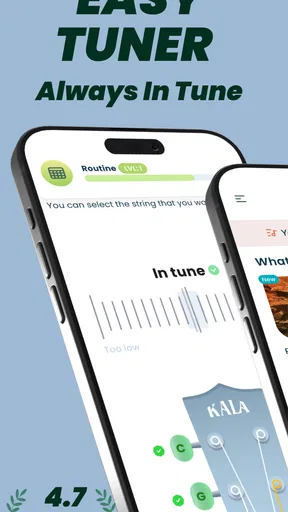
Now, let's talk about the features. This app is packed with them! First off, the tuner is a lifesaver. I can't tell you how many times I've struggled with tuning my ukulele by ear. With Kala, it's a breeze. The tuner is precise and easy to use, which means you can spend more time playing and less time fiddling around.
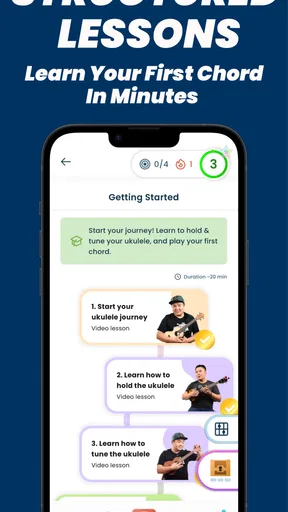
The lessons are where the magic happens. They start off simple, teaching you the basic chords and gradually increasing in complexity. The step-by-step video tutorials are like having a personal instructor, and the quality is top-notch. It felt like I was attending a private lesson, but from the comfort of my couch.
- Interactive games: These make learning fun and engaging. It's like playing a game while learning chords and strumming patterns.
- Song library: A wide variety of songs to choose from. Whether you're into pop, rock, or traditional ukulele tunes, there's something for everyone.
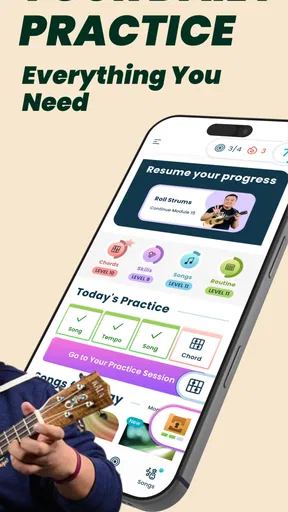
- Progress tracking: You can see how far you've come, which is really motivating.
Why Kala Stands Out
One of the things I really appreciate about Kala is its community aspect. You can connect with other learners, share your progress, and even join challenges. It adds a social element that makes the learning process less isolated. Plus, seeing others’ progress can really push you to keep going.
Another standout feature is the app's ability to adapt to different skill levels. Whether you're a total newbie or someone who just needs a refresher, Kala has got you covered. The lessons are designed to be comprehensive yet flexible, allowing you to learn at your own pace.
Practice notes that help it click
I’d use the tuner as a checkpoint rather than a reason to keep adjusting every string between exercises. Tune before practising, play for a few minutes, and check again only if something sounds noticeably off. That keeps a beginner from spending more time staring at the screen than building the habit of listening. It also makes the tuner useful to a shared household: each person begins with the same basic check, then the instrument can move straight into the lesson.
For the video lessons, I’d pause after a demonstrated chord and copy the hand position before trying to keep up with the whole sequence. A screen can make a useful model, but it is easy to watch passively and feel as if the movement has been learned. Repeating the change slowly, then trying it without looking at the screen, is a better test. If the chord sounds unclear, reduce the speed of the practice rather than repeatedly restarting the full lesson.
The games and progress tracking can make repetition feel less like homework, especially for someone who needs a small sense of momentum. I would still treat progress indicators as encouragement, not a complete measure of musical ability. A learner may improve at recognizing a chord or completing a task before their strumming sounds steady. Listening back carefully—and asking another person to listen when possible—fills that gap in a way an on-screen record cannot.
How it compares with other ways to learn
Compared with searching for individual ukulele videos, a guided app has the advantage of keeping lessons, tuning, and practice in one place. Online videos can be excellent for a particular song or technique, but the learner has to decide what to watch next and whether the advice fits their level. Kala’s structured lessons are more convenient when the main obstacle is knowing where to begin. On the other hand, a human instructor is better at noticing tension, awkward finger placement, and timing problems as they happen.
A standalone tuner may be the simpler choice for someone who already plays and only needs help getting in tune. Kala is more worthwhile when the tuner is part of a larger learning routine, rather than the sole reason to install it. Likewise, a song-chord reference can be quicker for a player who wants to look up one tune without following lessons. The trade-off is clear: this app is strongest when a beginner wants instruction and practice in the same experience, not when an experienced musician needs a narrowly focused utility.
Practical limits before you settle into a routine
Video-led learning depends on having enough attention and a comfortable way to view the screen while holding the instrument. If the phone is awkwardly placed or the room is noisy, a demonstration can be harder to follow than a printed chord reference. I’d set the device somewhere stable and visible before practising, and keep the session short enough that the learner can look up when needed. The app can guide the sequence, but it cannot remove the physical adjustment involved in learning an unfamiliar instrument.
There is also a difference between feeling guided and receiving personal correction. A lesson can demonstrate a movement repeatedly, but a beginner may still press too lightly, mute a nearby string, or rush a transition without realizing why the sound is uneven. When that happens, repeating the same video may not solve it. Ask another player to listen, compare the sound with the demonstration, and return to the lesson with one specific problem in mind. That makes the app a useful coach for practice, not a replacement for every kind of feedback.
For anyone deciding whether it suits their device, the app is free and is listed for Android 8.0 and later. It has a 4.6 average from around 5.1 thousand ratings, with over 500 thousand installs, which suggests that it has found an audience among people exploring ukulele learning. It was released on January 13, 2016, and its current version is 3.16.0. Those details are useful context, but I’d still judge it by whether its teaching style fits the person who will actually practise.
A household verdict
For a household sharing one ukulele, I see the app as a practical common starting point: one person can use the lessons to learn the basics, another can help choose a song, and everyone can use the tuner before taking a turn. It works best when the group keeps sessions simple and does not expect a phone app to handle account boundaries, scheduling, or individual instruction. If your household wants a structured introduction and is happy to learn at its own pace, I think it is worth trying. If you need personal feedback, advanced musicianship training, or only a quick tuner, a teacher or a more focused tool will serve you better.
Final Thoughts
After spending some quality time with the Kala: Learn Ukulele & Tuner app, I can say it's a must-have for anyone interested in picking up the ukulele. From its user-friendly design to its robust features, it's clear that this app was created with musicians in mind. It's not just an app, it's a companion in your musical journey.
So, if you're looking to strum your way into the world of ukulele, give Kala a try. You might find yourself hooked, just like I did. And who knows? You might just become the next ukulele virtuoso!
Verdict
Strengths of Kala: Learn Ukulele & Tuner
- Intuitive interface for beginners.
- Wide variety of ukulele tutorials.
- Accurate built-in tuner feature.
- Engaging lessons with progress tracking.
- Supports offline learning for convenience.
Limitations of Kala: Learn Ukulele & Tuner
- Limited free content; premium needed.
- Ads can interrupt practice sessions.
- Requires internet for some features.
- Occasional app crashes reported.
- Lacks advanced techniques for pros.
Other Releases by Musopia
View All
Justin Guitar Lessons & Songs
Education4.5
Similar Picks in This Category
View All
YouTube Music
Google LLC4.4

Samsung Music
Samsung Electronics Co., Ltd.3.8

Spotify: Music and Podcasts
Spotify AB4.3

JioSaavn - Music & Podcasts
Saavn Media Limited4.3

Lark Player:Music Player & MP3
Lark Player Studio - Music, MP3 & Video Player4.6

StarMaker: Sing Karaoke Songs
SKYWORK AI PTE. LTD.4.3
Frequently Asked Questions
What is Kala: Learn Ukulele & Tuner and who is it for?
Kala: Learn Ukulele & Tuner is an educational app designed for beginners and intermediate players looking to learn the ukulele. It offers lessons, tutorials, and a built-in tuner. It's perfect for anyone wanting to improve their skills or start from scratch with an easy-to-use, interactive platform.
How does the tuner feature work in the Kala app?
The tuner feature in Kala is designed to help users accurately tune their ukulele. It uses the device's microphone to detect pitch and provides visual cues to guide you to the correct tuning. This ensures that your ukulele sounds perfect for practice and performance.
What types of lessons are included in the Kala app?
Kala offers a variety of lessons, including beginner tutorials, chord progressions, and strumming techniques. The lessons are interactive and include video demonstrations to help users learn at their own pace. This makes it easy to follow along and improve your skills efficiently.
Is Kala: Learn Ukulele & Tuner suitable for children?
Yes, Kala is suitable for children as well as adults. The app's user-friendly interface and engaging lessons make it accessible for younger users. Parents can feel confident that the content is educational and designed to foster a love for music in a fun and supportive environment.
Are there any costs associated with using Kala: Learn Ukulele & Tuner?
Kala offers a free version with basic features, but there are in-app purchases available for premium content. These may include additional lessons, songs, and other advanced features. Users can choose to upgrade for a more comprehensive learning experience.
